The All-in-One Business Ops Platform

Stop renting 5 tools to run your business.

The only platform with a purpose-built task system and an independent SQL database engine — two first-class systems that natively talk to each other. AI builds your workspace in minutes. One subscription. No third-party glue.

Your work
Your data

The same customer record — on the task and in your database, always in sync. No copy-paste, no second tool.

Skip the setup. Tell AI what you do.

Most tools hand you an empty board and a setup wizard. Konduit hands you a working workspace.

From description to working workspace in minutes — not days.

Describe your business in plain English. AI generates spaces, lists, datatables, custom fields, forms, automations, and a dashboard — populated with realistic sample data so you can use it immediately.

  • Works for any vertical — agencies, MSPs, construction, field service, property management, recruiting, legal
  • Refine in chat — “add an Invoiced status”, “split this list by region”
  • Free tier gets 10 lifetime AI actions. Pro and Business get monthly pools.
I run a small HVAC business — service calls, maintenance contracts, parts inventory, dispatch.
Got it. Building a workspace with: Customers + Equipment datatables, Service Calls list, Maintenance Contracts list, dispatch automations, and a parts-inventory mini-board.
Tell us about your business…

Five tools. Five subscriptions.
Five places things break.

You’re paying for a task tool, a database tool, a form tool, and something to wire them together. Your data still doesn’t flow.

What you’re paying today:*

Task tool (Monday, ClickUp)$9–$30 / seat / mo
Database (Airtable, Notion)$20–$45 / seat / mo
Form tool (Typeform, Jotform)$25–$50 / mo
Document generator (PandaDoc, DocuSign)$25–$65 / mo
Automation glue (Zapier, Make)$20–$70 / mo
Total per user$100–$260+ / mo

What Konduit costs:

$10 / seat / mo
Everything included. One platform.
Tasks · Database · Forms · Documents · Automations · Dashboards · APIs
See Pricing →

*Representative third-party pricing, per seat where applicable, compiled from each provider’s public pricing as of June 2026. Plans, tiers, and prices vary by provider and are subject to change — verify current rates on each provider’s site.

Two first-class systems.
One platform.

Click any card for what’s under the hood.

Built for real work.

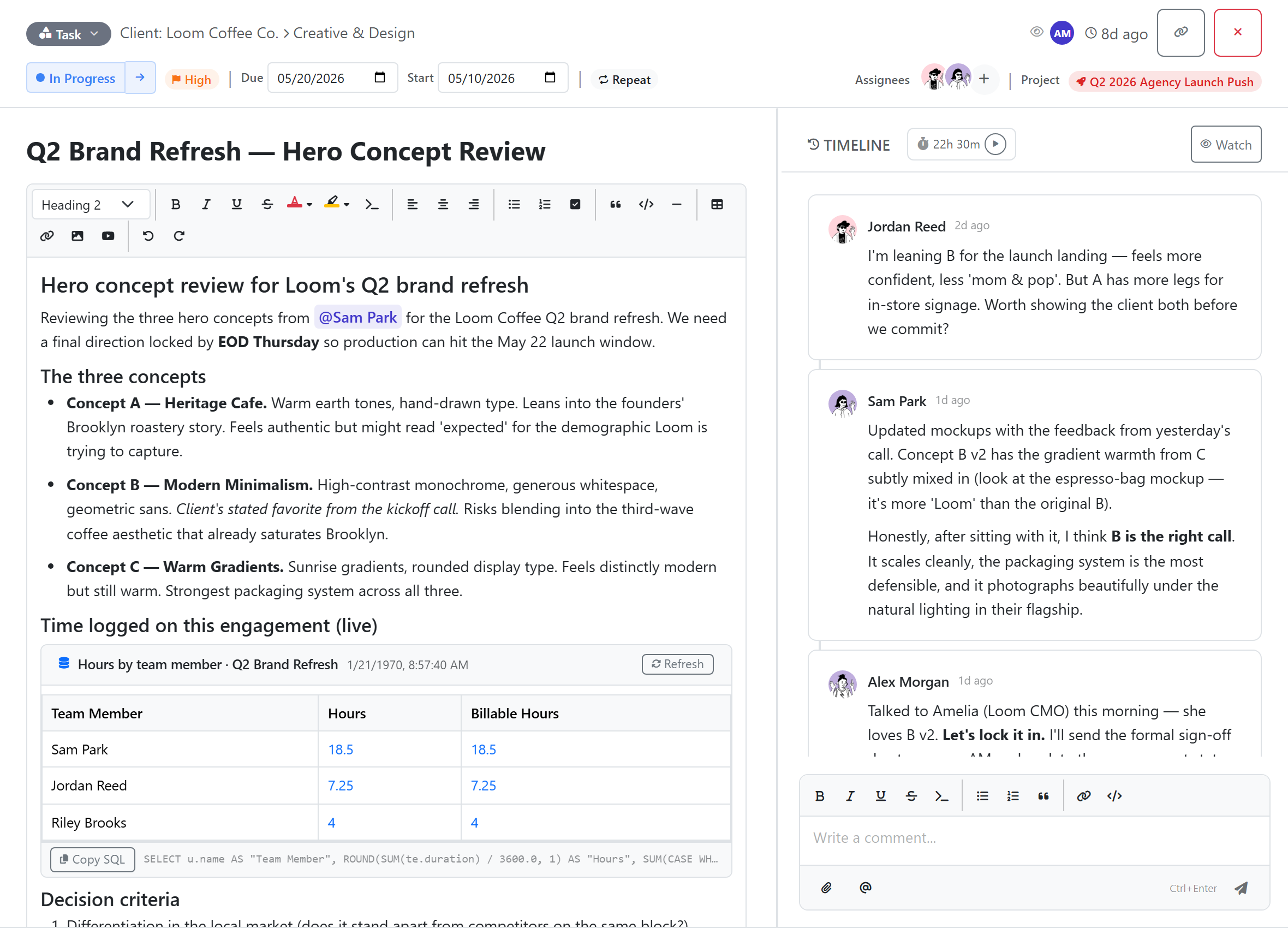
Rich task panel with custom fields, embedded query block, comments.

Rich task panel with custom fields, embedded query block, comments.

The whole picture.
Not half of it.

Here’s what you get in Konduit that no single competitor gives you in one place.
CapabilityKonduitMondayAirtableClickUp
Real SQL queries (JOINs, GROUP BY, aggregates)✓ Built inGraphQL API onlyNo SQL queriesNo SQL queries
Tasks ↔ database live-linked✓ Realtime syncMirror columns; types must matchNo distinct task entityTables are task views, not a separate DB
Forms can update existing items✓ Create or updateCreate onlyForms create recordsForms create records
Native template-based document generation✓ Variables + mail-merge built inVia integrations (PandaDoc, DocuGen)Via integrations (Documint, Formstack)Via integrations
Tracked time → invoice document✓ Time + line items + templatesVia external billing softwareVia external billing softwareVia external billing software
Native dashboards & charts✓ Included from Pro ($10/seat)Chart View on paid tiersCharting on paid tiersFree capped; unlimited on paid tiers
Approval gates in automations✓ Native approve/reject stepDIY via status-change automationsDIY via status field + automationMulti-step on higher tiers
Built-in automation runs / monthPro 5k · Business 25kStandard 250 · Pro 25k · Ent 250kFree 100 · Team 25k · Bus 100kFree 100 · Business 5k · Ent 250k
API as backend (rate limit)Per-key + monthly capsGraphQL, complexity-based5 req/sec/base (every plan)100/min Free–Bus · 10k Ent

Comparison verified against each platform’s official pricing pages, support docs, and public feature-request portals as of 2026-05-10. Tier prices and limits change — verify current capabilities at monday.com/pricing, airtable.com/pricing, and clickup.com/pricing. All product names, logos, and brands are property of their respective owners and are used for identification only; their mention does not imply endorsement.

Start free. Scale when you’re ready.

No credit card required. No trials. Limits are soft-capped — your apps don’t break if you spike.

Free
$0
For getting started and personal use.
  • 3 members, 3 spaces, 10 lists
  • 3 DataTables (250 rows each)
  • 1 form (100 submissions / mo)
  • 5 custom fields, 3 saved views
  • 3 document templates
  • 10 AI workspace actions (lifetime)
  • 50 MB storage
Request access
Business
$20 / seat / mo
For growing teams and serious operations
  • Everything in Pro, plus:
  • 25 DataTables (50,000 rows each)
  • Unlimited forms + automations + reports
  • Unlimited custom fields + document templates
  • Unlimited automation rules · 25,000 runs / mo
  • 10 API keys · 500,000 calls / mo
  • 5,000 AI actions / mo (workspace pool)
  • Email branding · Member groups
  • SSO/SAML · Audit log · Admin dashboard
  • 50 GB storage
Request access

Add-ons available on any paid plan: AI actions ($5 / 100 · $25 / 1k · $125 / 10k), API calls, automation runs, routines, storage, datatable rows. Buy what you need, when you need it.

Built from necessity.
Not a business plan.

Every few months, someone hired me to build an internal tool — a CRM, an order tracker, a service-request system, a project board with custom fields. Every project looked the same underneath: records, relationships, tasks, forms, reports. Just slightly different shapes of the same thing.

Their other option? Stitching four or five SaaS tools together — one for tasks, one for data, one for forms, plus Zapier to glue them — paying $100–$260 a seat to assemble something that still felt brittle. The bigger companies could afford custom dev. The smaller ones suffered through the duct-tape.

I kept thinking: every business needs internal tools — only the ones who can afford custom dev get them done right. So I started building the platform I’d been re-building for clients over and over — a real task system, a real database, forms, documents, automations, dashboards, and an API — and made it something anyone could pick up.

I don’t just sell this product. I use it every day. Konduit’s customer feedback, feature requests, and roadmap all run onKonduit. The platform that helped me stop re-building the same admin tool for the tenth time is the platform I’m betting my work on. If it can run me, it can run your business.

Questions you’re probably asking.

Konduit is in private beta right now — access is invite-only while we work closely with our first group of teams. Request access and we'll reach out as we open more spots.

There's no trial clock — instead there's a genuinely free plan (a limited version of the full product) you can use as long as you like, no credit card to start.

When you need more, Pro is $10 per seat / month and Business is $20 per seat / month, billed for the seats you use. You can change or cancel anytime.

No — and the AI builder is exactly why. You describe your business in plain English, and Konduit builds a working workspace with the right structure for your operation. No setup wizard, no configuration weekend, no consultants.

Power-user features like the SQL Console and visual query builder are there when you want them. Day one, you don't need to touch any of it. Many teams never do.

Tell it what kind of business you run. The AI generates spaces, lists, datatables, custom fields, forms, automations, and a dashboard — all populated with realistic sample data so you can immediately see how it works for your operation.

Generation takes a few minutes. You can refine in chat afterward: 'add an Invoiced status', 'rename Customers to Clients', 'split work orders by region'. Every workspace is a starting point you own.

Each generation and each chat refinement uses an AI action from your workspace's pool — the free plan includes 10 lifetime actions to try it out; paid plans get a monthly pool (500 on Pro, 5,000 on Business).

No. The AI builder is the fastest way — describe your business and it assembles a working workspace (tasks, datatables, forms, dashboards) in minutes — but you can also build everything yourself by hand and customize every detail.

Want ideas first? Browse the gallery of example workspaces — like an HVAC contractor or a marketing agency — to see what a finished Konduit setup looks like, then build your own with AI or by hand.

Konduit's tasks, datatables, forms, automations, dashboards, and documents all live on the same data layer. When a form submission comes in, it writes directly to your database or creates a task — no middleware between two SaaS tools, no webhook chain to maintain.

Our own features don't need integrations to talk to each other because they're already connected. That's the whole reason Konduit exists.

For external tools (Slack, Stripe, GitHub, etc.), Konduit exposes a REST API and webhooks — developer building blocks, not one-click connectors (yet). Anything that can make an HTTP request can talk to Konduit.

Airtable's strength is the spreadsheet UI; many teams use it as a friendlier database. Konduit's DataTables is built as a SQL engine first — JOINs, GROUP BY, ORDER BY, foreign-key relationships, automatic indexing — with a spreadsheet UI on top. Use the spreadsheet for everyday work; drop into SQL when you need real querying.

Capacity differs by tier on both sides — see the pricing page for Konduit's current per-table row limits.

ClickUp's task system is excellent and many teams love it. The difference is structural: ClickUp's table views present task data; Konduit ships a separate database layer alongside tasks. Custom fields can reference a row in a DataTable, so your tasks can link to inventory, customers, projects, or anything you're tracking — the two systems stay distinct but speak to each other natively.

If your work is mostly tasks and conversations, ClickUp is a great fit. If your work needs structured business data living alongside the tasks — a customer record, an order, an inventory item — that's where Konduit's separate database layer earns its keep.

For task management, structured data, forms, automations, document generation, dashboards, and API-powered content — that's the goal: one platform instead of four or five subscriptions.

We're not trying to replace your email client, your design tool, or your code editor. We replace the operational core — the tools you use to manage work, organize data, capture leads, automate workflows, generate documents, and power external content.

Your apps don't break. Most limits are soft-capped — you'll get a nudge to upgrade, but data keeps flowing and automations keep running. Hard limits (like AI credits and API rate limits) reject the specific call cleanly so a runaway script can't drain your account.

Add-on packs let you expand in place on a paid plan: extra AI actions ($5 / $25 / $125), API calls, automation runs, and form submissions. Buy what you need, when you need it.

Your data is yours. We don't sell it, and we don't use your content to train AI models — and we don't permit our AI providers to train on it either. AI features only process what's needed to answer the request you make.

See our Privacy Policy for the full picture.

You're never locked in. You can export your tables to CSV and delete your workspace at any time; paid plans can be cancelled from billing settings whenever you like.

Deleting a workspace permanently removes its content — see our Terms and Privacy Policy for how deletion and retention work.

Stop duct-taping your
business together.

One platform. One subscription. Your tasks and your data, finally in one place.